How to plan media for your lessons
As teachers, education influencers and instructional designers, we always find ourselves wondering: which media should we use to boost our learners' learning? Communication tools are many, and in general they should be used to convey information and make it easier to absorb the content. They should help the teacher pass facts, skills, attitudes and knowledge on to the learner.
As an educational content creator, though, you shouldn't always make a salad of content and resources, because that can distract your learners and make learning tiring. And there's no such thing as one medium that works best.
Yes, I'm looking at that retention pyramid, which is a lie.
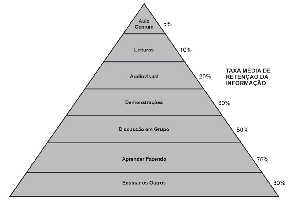
You should use combined strategies to help your learners absorb the content better. Broadly speaking, the format categories are text, visual media, audio and audiovisual. Essentially, you will need to use different media for different types of learning.
Here we'll look at the different media resources and how they can be used (and in which situations) in your educational content.
Why diversify the visual resources in your content?
While text tends to be absorbed slowly, it can be very useful for grasping the basics of a field. Images and videos, on the other hand, have a deeper impact on the learner and explain concepts that have relationships and hierarchies with other areas.
These perceptions matter for the learner's process. Engaging content is important to get them excited about learning. A 1,000-page book can teach them everything they need about a specific field, yes, but we have to consider how easy it is to get through and the wear and tear it can cause along the way.
You can use different resources in any teaching model: in person, online or hybrid. Lean on technology to improve your teaching and increase your learners' retention, because there are incredibly simple but equally powerful solutions.
Media resources complement the teacher's knowledge and teaching approach by offering learners different ways to understand and interact with the content. You can even have the learners generate content themselves, as in forums, social networks and group projects.
A word of caution
Using a variety of visual resources can raise some concerns, and one thing you should always keep in mind is: don't diversify for the sake of diversifying. More is definitely not less. Try to organize yourself and act with intention and purpose. Don't make an infographic just because the tool is free and pretty, when there's no hierarchy or relationships to show and you just want to add icons. Or add clickable elements to your page just because they're "interactive." Do things with intention.
Understanding the events of instruction
One of the best-known theories is Gagné's events of instruction. It works as a sequence for a lesson, running from capturing the learner's attention to assessing their knowledge. Not every lesson needs to tick every box, but as a rule you'll end up following an order.
The events of instruction are:
- Gain attention (reception)
- Inform learners of the objective (expectation)
- Stimulate recall of prior learning (retrieval)
- Present the stimulus (selective perception)
- Provide learning guidance (semantic encoding)
- Elicit performance (responding)
- Provide feedback (reinforcement)
- Assess performance (retrieval)
- Enhance retention and transfer (generalization)
Robert Gagné doesn't present these events as an absolute order. Adult learners can even provide some of the events themselves, leaving the teacher to provide the materials and run the assessment, for example.
An example of a lesson that follows the events:
Table 01:
| Event of instruction | Activity |
|---|---|
| Reception | Hey everyone! |
| Expectation | Today we'll learn about emotional intelligence in customer service... |
| Retrieval | In the previous lesson, I explained that you'll face unexpected situations with your customer and you need to prepare for those moments. |
| Selective perception | This lesson aims to give you a more visual framework with practical tips on how to develop emotional intelligence for customer service specifically. |
| Semantic encoding | Within the context of EI, you have self-awareness, self-management, awareness of others and relationship management. |
| Responding | Now, you'll match each of the sentences with one of the four stages of EI. |
| Reinforcement | You should have matched sentence A with the self-awareness stage. |
| Retrieval | Let's run an assessment with a quiz... |
| Generalization | Let's see how this plays out in practice with a role-play. |
Types of learning objectives and how to support them
Within learning theory, there are verbs associated with different kinds of learning and learner needs. We'll get into that topic in more depth later.
What matters is that there are several types of learning outcomes and, for each one, there is at least one way to guide the learner toward grasping the concept.
Table 02:
| Type of learning | Example | How to support it |
|---|---|---|
| 1) Discrimination | Distinguish words with the "u" sound from the "o" sound in French. | Point out the distinguishing features of the object to be discriminated. |
| 2) Concepts | Identify what the spatial relationship "above" is. | Give hints for identifying the attributes. |
| 3) Definitions | Classify the concept of "family" using a definition. | Present the component concepts in an appropriate sequence. |
| 4) Rules | Demonstrate addition and subtraction by solving examples. | Show how each concept builds the rule. |
| 5) Problem solving | Generate, by synthesizing applicable rules, a paragraph describing a person's actions in a conflict situation with a customer. | Provide the minimum hints necessary to lead the learner to select and apply the appropriate rules. |
| 6) Cognitive strategies | Devise a solution to the customer's problem by applying emotional intelligence techniques. | Offer hints and indirect instructions. |
| 7) Motor skills | Parallel park a car. | Encourage learners to recall the sequence of actions and give feedback on practice. |
| 8) Attitudes | Choose reading as a pastime. | Establish a model, show its behavior and how it can be reinforced. |
| 9) Names and labels | Name the skill of identifying and managing your emotions. | Provide codes or memory aids. |
| 10) Facts | Recount the political events of 2016. | Provide meaningful context. |
This is a fairly robust theory, but essentially, for each type of content you set out to teach, you can support learning in a particular way. Broadly, items 1 to 8 represent an order of learning. Items 9 and 10 were added because they require more specific ways of remembering.
For each kind of educational content you create, you will draw on one of these learning objectives. In a history lesson, roughly speaking, you'll have far more facts and names, for example. In a sales lesson, you may apply more concepts, strategies and problem solving.
Creating a media plan
Next, when you're designing your lesson, you should have a table similar to this one:
Table 03:
| a) Events of instruction | b) Learning objectives | c) Activity | d) Desired media |
|---|---|---|---|
In column A, you'll list each of the events of instruction you plan to use in your lesson. Keep in mind that each lesson will have its own events. A lesson can be a module, a day of teaching or a sequence of short videos. You decide that. Think of content that has a beginning, a middle and an end.
In column C, describe the activity and how it will be carried out, as I did in Table 01. Then, make an initial plan of which media can support that learning.
There is no theory, however, that confirms which medium is best for which objective. There are some generalizations, but ultimately it depends on the instructor's preference and knowledge of the target audience.
How to apply each medium in your plan
There is a very famous publication by Richard Mayer that outlines 12 principles for using multimedia in teaching. You can read the original material and its examples here.
- Coherence principle: People learn better when extraneous words, pictures and sounds are excluded rather than included.
- Signaling principle: People learn better when cues highlight the organization of the essential material.
- Redundancy principle: People learn better from graphics and narration than from graphics, narration and on-screen text.
- Spatial contiguity principle: People learn better when corresponding words and pictures are presented near each other rather than far from each other on the page or screen.
- Temporal contiguity principle: People learn better when corresponding words and pictures are presented simultaneously rather than successively.
- Segmenting principle: People learn better from a multimedia lesson presented in user-paced segments than as a continuous unit.
- Pre-training principle: People learn better from a multimedia lesson when they know the names and characteristics of the main concepts.
- Modality principle: People learn better from graphics and narration than from animation and on-screen text.
- Multimedia principle: People learn better from words and pictures than from words alone.
- Personalization principle: People learn better from multimedia lessons when the words are in conversational style rather than formal style.
- Voice principle: People learn better when the narration in multimedia lessons is spoken in a friendly human voice rather than a machine voice.
- Image principle: People do not necessarily learn better from a multimedia lesson when the instructor's image is added to the screen.
Some media ideas you can use
Based on this, you should select when and which media to add to your content. Here are some ideas of what you can offer.
Table 04:
| Type of activity | What to use | Examples |
|---|---|---|
| Form a mental image of something | Present a model or an image of the object. | When explaining what a plant is for the first time, it may be helpful to show a picture of one (or several). |
| Highlight what matters most and the focus of the lesson | A model or diagram, such as a drawn chart or a keyword on screen in a stylized way | Instead of showing a whole car with all its gears in a lesson about tires, simplify the bodywork or desaturate it. |
| Make something hidden or inaccessible visible | Model, photo, or an animation that deconstructs the object | If you want to explain the car's gears, you can make the bodywork transparent or remove it entirely. |
| Make abstract information clear | Diagram or columns of images | To explain the concept of emotional intelligence and its parts, create a pie chart with each of the four parts |
| Condense large amounts of information | Diagrams or flowcharts | Explain the whole step-by-step sales process |
| Promote mental activity | Text, images and film | Accompany your narration with physical materials and visual representations on screen for greater engagement |
| Prompt an emotional reaction | Films, animations, role-plays or artistic images | In a lesson on event planning, show an instructional video with a role-play of the various problems an organizer can face to make it more tangible. |
| Reinforce a concept and its practical application | Podcast, expert interview or a third party's video | After a lesson on sales objections, an interview with a head of sales at a company talking about the difficulties they face. |
It's worth noting that this is a guide based on our experience.
How to build a media plan for your lessons
Planning a lesson is not an easy task. The content may not be a challenge for many subject-matter experts. The real challenge is building a lesson that appeals to your learners' different senses so they have an emotional and affective reaction to the content.
Your role as an education influencer is to reinforce this learning with proper planning for each lesson, mainly by highlighting the most important content, reinforcing it afterward, and hiding or desaturating irrelevant content.